It was an ordinary evening in the living room. My son had the Fire TV remote and was picking his way across the on-screen keyboard, one letter at a time, towards the name of a programme he wanted. He got as far as P, then O. He wanted to watch Pororo.
This is what the television offered him.
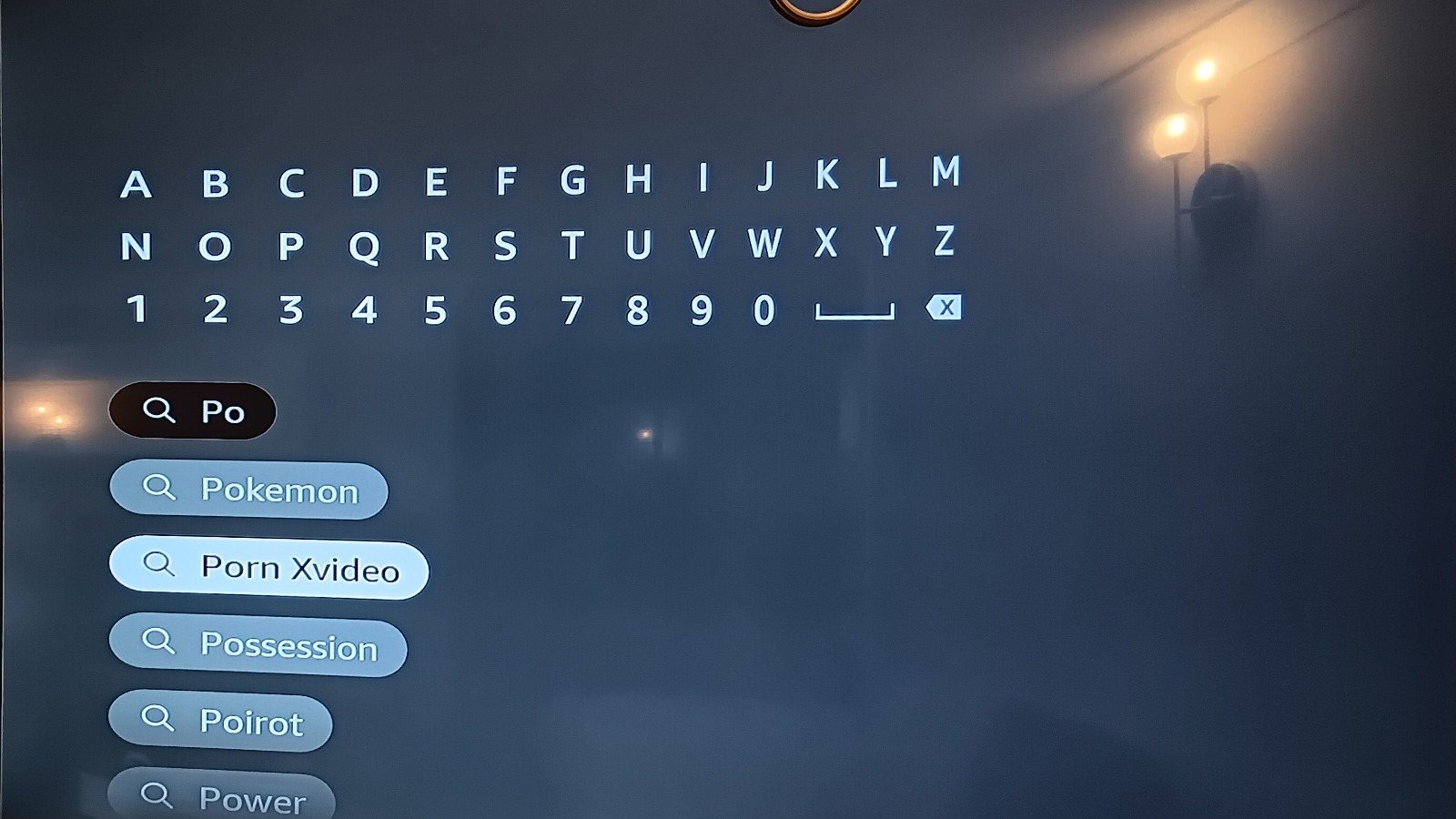
Second in the list. Above Poirot. Above Power. One press of a directional pad away from a five-year-old's thumb.
Nobody in this house has searched for that. Not on that device, not on that account, not once. And this is not a box straight out of the carton with nothing configured - there are children's profiles set up on it, which is precisely the thing every guide tells you to do.
This is not a parental control that failed
That distinction matters, because it decides what you can do about it.
A parental control that failed would be one that was switched on, was supposed to cover this, and did not. What actually happened is that the search suggestion list was never in scope. Fire TV's parental controls are built around two questions: can this profile play this thing, and can this profile buy this thing. Both are enforced with a PIN, and both work.
The suggestion list sits before either question is asked. It is not playback and it is not a purchase. It is a list of words, drawn from what the platform believes people are looking for, painted onto the screen the moment a second character is typed. Nothing in the child-profile machinery reaches it, because nothing in the child-profile machinery was pointed at it.
So the family-friendly profile is real, the PIN is real, the curated rows on the home screen are real, and the search field above them is a completely open door.
What happens if he presses it
He does not get a pornography app, because there isn't one to install. He gets something slightly worse for being unremarkable: the Silk browser opens, runs the phrase as a web search, and the results are the results. From there it is two more presses.
The suggestion does not have to be harmful on its own. It only has to be a signpost, and a signpost is exactly what it is.
What actually works, and what only looks like it works
I have spent an evening on this since, and the honest summary is that every layer covers part of the problem and no layer covers the problem.
Fire TV parental controls. Worth switching on. PIN-gates playback and purchases by rating. Does not touch search suggestions.
Children's profiles. Worth setting up. Curates what is presented. Does not appear to constrain the suggestion pool behind the search field.
Pi-hole, or any DNS filter you run yourself. Genuinely effective, and the layer I would put first, because it is the only one that covers every device on the network at once rather than one vendor's app. I run one here. Its weakness is not the filtering; it is that a device only uses it if it is made to.
Your router. Which is where the last one comes apart. My BT router will not let me remove BT's own DNS servers from the configuration, so there is always a resolver on the network that my filtering does not sit in front of, and anything that finds it gets clean answers to dirty questions. You can turn on BT's own parental controls instead, and they do work - but now the filtering lives in a third place, with a third set of rules, controlled by a company whose interest in the question ends at the edge of their own network.
The platform's own web browser. Silk on a Fire TV has its own settings, separate from everything above.
Five controls, five owners, five sets of rules, and a gap between each pair of them big enough for a search suggestion to walk through.
The part that annoys me
None of this is hard. Filtering an autocomplete list against the profile that is currently signed in is not a research problem. It is a product decision that nobody made, on a surface nobody owned, in a company large enough that both of those things can be true for years without anyone noticing.
And the reason it stays unfixed is structural. Amazon is not incentivised to make my Pi-hole work. BT is not incentivised to make Amazon's profiles work. Every layer is owned by somebody whose responsibility stops at their own boundary, and the household - which is the only place where all of it has to work at once - is the one party with no seat at the table and no tooling.
A parent is left to assemble a safety system out of five products that were not designed to be assembled, and then to somehow know which of the five has a hole in it this month.
What I want to exist
Not another app with a filter in it. There are plenty of those, and they each solve one fifth of the problem and then ask for a subscription.
What is missing is much duller and much more useful: an honest, current, per-device account of what each of these controls actually does, what it demonstrably does not do, and what to put underneath it to cover the difference. Written by somebody who has switched the settings on and then gone looking for the gaps, rather than by the company selling the box.
I am going to start writing that down. This is the first entry in it.
If you have a Fire TV in the house, go and type two letters into the search field tonight and see what it offers you. I would very much like to be told that my living room is the exception.